Summary: in this tutorial, you will learn how to use the SQL Server CASE expression to add if-else logic to SQL queries.
SQL Server CASE expression evaluates a list of conditions and returns one of the multiple specified results. The CASE expression has two formats: simple CASE expression and searched CASE expression. Both of CASE expression formats support an optional ELSE statement.
Because CASE is an expression, you can use it in any clause that accepts an expression such as SELECT, WHERE, GROUP BY, and HAVING.
SQL Server simple CASE expression
The following shows the syntax of the simple CASE expression:
CASE input
    WHEN e1 THEN r1
    WHEN e2 THEN r2
    ...
    WHEN en THEN rn
    [ ELSE re ]
END
Code language: SQL (Structured Query Language) (sql)
The simple CASE expression compares the input expression (input) to an expression (ei) in each WHEN clause for equality. If the input expression equals an expression (ei) in the WHEN clause, the result (ri) in the corresponding THEN clause is returned.
If the input expression does not equal to any expression and the ELSE clause is available, the CASE expression will return the result in the ELSE clause (re).
In case the ELSE clause is omitted and the input expression does not equal to any expression in the WHEN clause, the CASE expression will return NULL.
A) Using simple CASE expression in the SELECT clause example
See the following sales.orders table from the sample database:
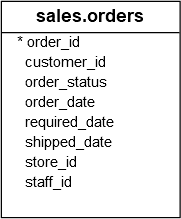
This example uses the COUNT() function with the GROUP BY clause to return the number orders for each order’s status:
SELECT
    order_status,
    COUNT(order_id) order_count
FROM
    sales.orders
WHERE
    YEAR(order_date) = 2018
GROUP BY
    order_status;
Code language: SQL (Structured Query Language) (sql)
Here is the output:
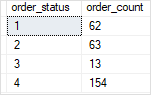
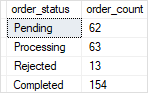
The values in the order_status column are numbers, which is not meaningful in this case. To make the output more understandable, you can use the simple CASE expression as shown in the following query:
SELECT
    CASE order_status
        WHEN 1 THEN 'Pending'
        WHEN 2 THEN 'Processing'
        WHEN 3 THEN 'Rejected'
        WHEN 4 THEN 'Completed'
    END AS order_status,
    COUNT(order_id) order_count
FROM
    sales.orders
WHERE
    YEAR(order_date) = 2018
GROUP BY
    order_status;
Code language: SQL (Structured Query Language) (sql)
The following picture shows the output:
B) Using simple CASE expression in aggregate function example
See the following query:
SELECT
    SUM(CASE
            WHEN order_status = 1
            THEN 1
            ELSE 0
        END) AS 'Pending',
    SUM(CASE
            WHEN order_status = 2
            THEN 1
            ELSE 0
        END) AS 'Processing',
    SUM(CASE
            WHEN order_status = 3
            THEN 1
            ELSE 0
        END) AS 'Rejected',
    SUM(CASE
            WHEN order_status = 4
            THEN 1
            ELSE 0
        END) AS 'Completed',
    COUNT(*) AS Total
FROM
    sales.orders
WHERE
    YEAR(order_date) = 2018;
Code language: SQL (Structured Query Language) (sql)
Here is the output:

In this example:
- First, the condition in the
WHEREclause includes sales order in 2018. - Second, the
CASEexpression returns either 1 or 0 based on the order status. - Third, the
SUM()function adds up the number of order for each order status. - Fourth, the
COUNT()function returns the total orders.
SQL Server searched CASE expression
The following shows the syntax of the searched CASE expression:
CASE
    WHEN e1 THEN r1
    WHEN e2 THEN r2
    ...
    WHEN en THEN rn
    [ ELSE re ]
END
Code language: SQL (Structured Query Language) (sql)
In this syntax:
- e1, e2, …ei, … en are Boolean expressions.
- r1, r2, …ri,…, or rn is one of the possible results.
The searched CASE expression evaluates the Boolean expression in each WHEN clause in the specified order and returns the result (ri) if the Boolean expression (ei) evaluates to TRUE.
If no Boolean expression evaluates to TRUE, the searched CASE expression returns the result (re) in the ELSE clause or NULL if the ELSE clause is not specified.
A) Using searched CASE expression in the SELECT clause
See the following sales.orders and sales.order_items from the sample database:
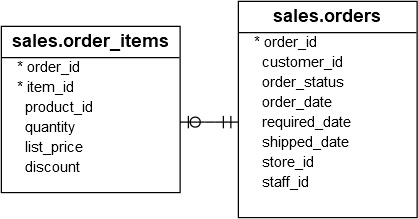
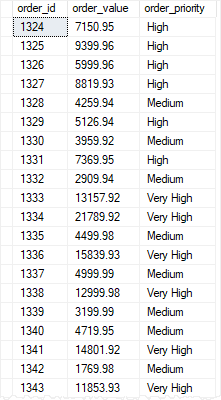
The following statement uses the searched CASE expression to classify sales order by order value:
SELECT
    o.order_id,
    SUM(quantity * list_price) order_value,
    CASE
        WHEN SUM(quantity * list_price) <= 500
            THEN 'Very Low'
        WHEN SUM(quantity * list_price) > 500 AND
            SUM(quantity * list_price) <= 1000
            THEN 'Low'
        WHEN SUM(quantity * list_price) > 1000 AND
            SUM(quantity * list_price) <= 5000
            THEN 'Medium'
        WHEN SUM(quantity * list_price) > 5000 AND
            SUM(quantity * list_price) <= 10000
            THEN 'High'
        WHEN SUM(quantity * list_price) > 10000
            THEN 'Very High'
    END order_priority
FROM
    sales.orders o
INNER JOIN sales.order_items i ON i.order_id = o.order_id
WHERE
    YEAR(order_date) = 2018
GROUP BY
    o.order_id;
Code language: SQL (Structured Query Language) (sql)
The following picture shows the partial output:
In this tutorial, you will learn how to use the SQL Server CASE expression to add if-else logic to the SQL queries.

