Summary: in this tutorial, you will learn how to use the SQL Server FULL OUTER JOIN to query data from two or more tables.
Introduction to SQL Server full outer join
The FULL OUTER JOIN is a clause of the SELECT statement. The FULL OUTER JOIN clause returns a result set that includes rows from both left and right tables.
When no matching rows exist for the row in the left table, the columns of the right table will contain NULL. Likewise, when no matching rows exist for the row in the right table, the column of the left table will contain NULL.
The following shows the syntax of FULL OUTER JOIN clause when joining two tables T1 and T2:
SELECT
    select_list
FROM
    T1
FULL OUTER JOIN T2 ON join_predicate;
Code language: SQL (Structured Query Language) (sql)
The OUTER keyword is optional so you can skip it as shown in the following query:
SELECT
    select_list
FROM
    T1
FULL JOIN T2 ON join_predicate;
Code language: SQL (Structured Query Language) (sql)
In this syntax:
- First, specify the left table
T1in theFROMclause. - Second, specify the right table
T2and a join predicate.
The following Venn diagram illustrates the FULL OUTER JOIN of two result sets:
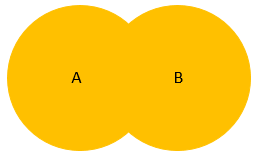
SQL Server full outer join example
Let’s set up some sample table to demonstrate the full outer join.
First, create a new schema named pm which stands for project management:
CREATE SCHEMA pm;
GO
Code language: SQL (Structured Query Language) (sql)
Next, create new tables named projects and members in the pm schema:
CREATE TABLE pm.projects(
    id INT PRIMARY KEY IDENTITY,
    title VARCHAR(255) NOT NULL
);

CREATE TABLE pm.members(
    id INT PRIMARY KEY IDENTITY,
    name VARCHAR(120) NOT NULL,
    project_id INT,
    FOREIGN KEY (project_id)
        REFERENCES pm.projects(id)
);
Code language: SQL (Structured Query Language) (sql)
Suppose, each member only can participate in one project and each project has zero or more members. If a project is in the initial phase, hence there is no member assigned.
Then, insert some rows into the projects and members tables:
INSERT INTO
    pm.projects(title)
VALUES
    ('New CRM for Project Sales'),
    ('ERP Implementation'),
    ('Develop Mobile Sales Platform');


INSERT INTO
    pm.members(name, project_id)
VALUES
    ('John Doe', 1),
    ('Lily Bush', 1),
    ('Jane Doe', 2),
    ('Jack Daniel', null);
Code language: SQL (Structured Query Language) (sql)
After that, query data from the projects and members tables:
SELECT * FROM pm.projects;
Code language: SQL (Structured Query Language) (sql)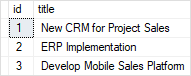
SELECT * FROM pm.members;Code language: SQL (Structured Query Language) (sql)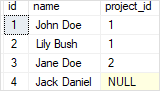
Finally, use the FULL OUTER JOIN to query data from projects and members tables:
SELECT
    m.name member,
    p.title project
FROM
    pm.members m
    FULL OUTER JOIN pm.projects p
        ON p.id = m.project_id;
Code language: SQL (Structured Query Language) (sql)
Here is the output:
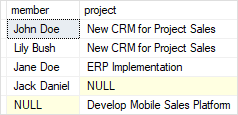
In this example, the query returned members who participate in projects, members who do not participate in any projects, and projects which do not have any members.
To find the members who do not participate in any project and projects which do not have any members, you add a WHERE clause to the above query:
SELECT
    m.name member,
    p.title project
FROM
    pm.members m
    FULL OUTER JOIN pm.projects p
        ON p.id = m.project_id
WHERE
    m.id IS NULL OR
    P.id IS NULL;
Code language: SQL (Structured Query Language) (sql)
The following picture shows the output:
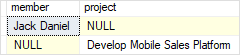
As clearly shown in the output, Jack Daniel does not participate in any project and Develop Mobile Sales Platform does not have any members.
In this tutorial, you have learned how to use SQL Server full outer join to query data from two or more tables.

