
When building an eCommerce store, security is often one of the first things successful businesses focus on.
After working with many store owners, we have seen that those who prioritize security early set themselves up for long-term success.
The smartest store owners know that security isn’t just about protection, it’s about earning trust. Our partner brands run their stores on WordPress and use proven strategies to secure their sites.
This focus on security has become a key part of what sets them apart.
In this guide, we will show you how to use the same practical security measures that help our stores protect their customer data and create a safe shopping experience for their customers.
💡Key Takeaways: eCommerce Security Checklist
In a hurry? Here are the most important eCommerce security tips that you need to follow:
- Hosting Matters: Use a secure provider like SiteGround. It keeps your site separated from others (so if one website gets hacked, yours stays safe) and constantly monitors for problems to fix them early.
- Layer Your Defenses: Always use a firewall (like Cloudflare) and keep software updated to block common threats and malware.
- Protect Entry Points: Secure login pages with Two-Factor Authentication (2FA) and limit login attempts to stop brute force attacks.
- Data Safety: Validate user input on forms to prevent SQL injection and run regular backups using a tool like Duplicator.
- Secure Payments: Use trusted gateways like Stripe or PayPal that handle PCI compliance off-site.
Why Secure Your WordPress Store?
You need to secure your WordPress store to protect customer data, prevent attacks, and maintain your business reputation.
Running an online store puts customer data and payments at risk, so strong security measures are essential to protect information and keep your business running smoothly.
Here’s why securing your store should be a top priority:
- Protect Sensitive Customer Data: Names, addresses, and payment details can be exposed during a breach, leading to identity theft and financial loss.
- Prevent Hacking And Malware Attacks: Security breaches can cause downtime, disrupt sales, and harm your brand reputation.
- Boost Traffic, Conversions, And SEO: Secure websites are favored by search engines, which can improve rankings and drive more visitors.
Next, we’ll share practical eCommerce security tips to safeguard your WordPress store.
- Use a Secure WordPress Hosting Provider
- 2. Keep Your eCommerce Plugin or Software Updated
- Use Firewall on Your Store
- Create a Secure Login Page
- Enable Two Factor Authentication
- Validate User Data
- Maintain Regular Backups For Your Store
- Use Secure Payment Gateways And Prevent Fake Orders
- Frequently Asked Questions About eCommerce Security
1. Use a Secure WordPress Hosting Provider
One of the key factors when creating a secure eCommerce store is to pick a good hosting plan. Hosting is where your website lives on the internet and stores all its data.
Low-cost hosting often lacks essential security features like firewalls and protection against cyberattacks, leaving your WordPress store vulnerable to hackers.
Plus, these providers could be using outdated servers and software and might not have proper site backups in case of hardware failure.
That is why we recommend using a popular and reliable hosting service like SiteGround. They have super fast servers and offer 24/7 customer support, backups, site migration, and a staging site.

SiteGround also provides a free domain name, SSL certificate, and CDN for your website. They can prevent malicious attacks, perform regular updates, and so much more.
Over the past few years, we have been using SiteGround to host our websites and eCommerce stores and had a great experience with them. Their reliable performance and excellent customer support have made them our go-to choice.
If you need more options, then you can see our top picks for the best WooCommerce hosting providers.
2. Keep Your eCommerce Plugin or Software Updated
Another security tip is to keep the eCommerce software you used to build your store regularly updated. Each updated version of the plugin comes with enhanced security, bug fixes, performance improvements, as well as new functions.
For example, if you have used WooCommerce to build an online store, then you must ensure that your WooCommerce plugin is updated at all times.
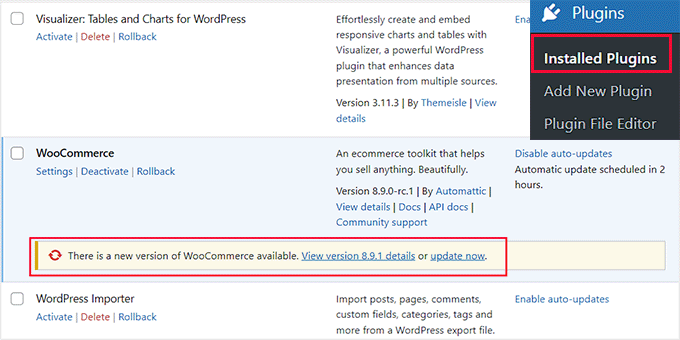
To do this, you can visit the Plugins » Installed Plugins page from the WordPress dashboard and scroll down to the ‘WooCommerce’ option. Here, you will see an alert notice if the plugin has just launched a new version.
However, before you do anything, you must create a complete backup of your website (see Tip #7 below). If anything goes wrong during the update, you can easily restore your store.
Once the backup is done, go ahead and click the ‘Update Now’ button to move to the latest version of the plugin.
Once you have done that, you should also update other WordPress plugins that you are using, like contact form plugins, coupon plugins, and more. For details, see our tutorial on how to properly update WordPress plugins.
We also recommend updating the WordPress theme that you are using on your store. This is because theme updates ensure your theme remains compatible with the eCommerce platform and WordPress updates.
It prevents any display issues or errors on your storefront. To update a theme, visit the Appearance » Themes page from the WordPress dashboard.
You will now see a yellow alert notice if the theme has an update that you can perform. From here, just click the ‘Update Now’ button to start the process.

For details, see our tutorial on how to update a WordPress theme without losing customization.
3. Use Firewall on Your Store
A WordPress firewall plugin acts as a shield between your website and incoming traffic. It scans and blocks any common security threats to your store, making it more secure.
A firewall plugin blocks hackers, prevents malicious traffic, and mitigates DDOS attacks. It can also improve your site’s performance and speed.
Cloudflare is a great firewall and security option. At WPBeginner, we have switched from Sucuri to Cloudflare due to its better uptime reliability, control over firewall rules, and DNS management.

For more details, you can see our complete WordPress security guide.
4. Create a Secure Login Page
If your online store allows customer registration, then another great eCommerce tip is to build a secure login page. This will make it difficult for hackers to steal customer login credentials.
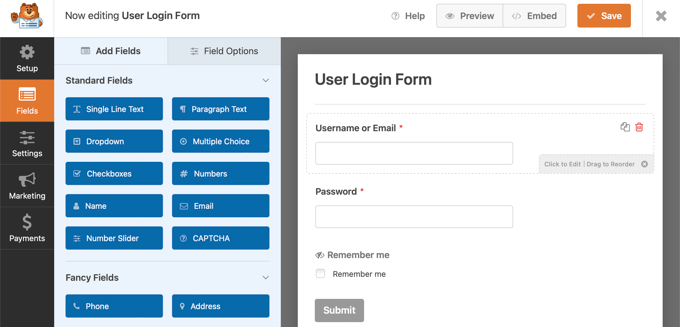
For this, we recommend WPForms, which is the best contact form plugin on the market. It has a specific addon that allows you to build a secure login and registration form in just a few minutes.
The plugin has complete spam protection and lets you build a form using the premade ‘Login Form’ template in the drag-and-drop builder.
For details, see our tutorial on how to create a custom WordPress login page.
Once you have done this, you can also limit login attempts to prevent brute-force attacks, in which hackers use thousands of username and password combinations in a short period.
To do this, just install and activate the Limit Login Attempts Reloaded plugin. For details, see our tutorial on how to install a WordPress plugin.
Upon activation, visit the Limit Login Attempts » Settings page and scroll down to the ‘Local App’ section. Here, you can type the number of times each user is allowed to add their login credentials before the account freezes.
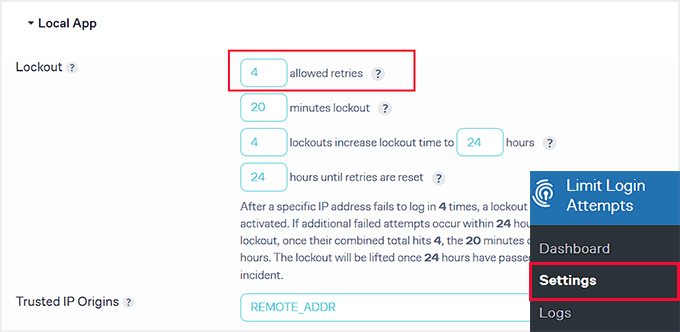
You can also make your login page GDPR-compliant using some of the other settings.
For more information, see our beginner’s guide on how and why you should limit login attempts in WordPress.
5. Enable Two Factor Authentication
Another way to create a secure login page on your online store is to enable two-factor authentication. This will protect your store from stolen passwords.
For this, you must use a smartphone authenticator app that generates a temporary one-time password for the accounts you save in it.
For instance, if a user adds the correct credentials for logging in, then they will also have to add a one-time password shown in the authenticator app to access your store.
To add this function, you can use Google Authenticator or plugins like WP 2FA.
For details on how to set this up, see our tutorial on how to add two-factor authentication for WordPress.
6. Validate User Data
Hackers often inject SQL attacks into online stores through fields used for entering user data, such as comment sections or registration form fields.
This attack targets your database server and adds malicious code or statements to your SQL. To prevent this, you can validate user data in your online store.
This means that user data will not be submitted to your store if it does not follow a specific format.
For instance, a customer won’t be able to submit their registration form if the email address field does not have the ‘@’ symbol. By adding this validation to most of your form fields, you can prevent SQL injection attacks.
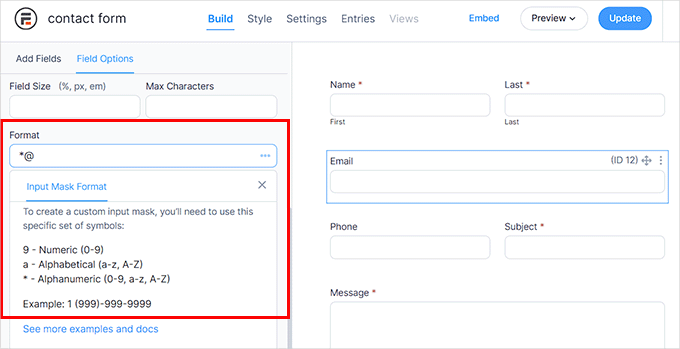
To get started, we recommend Formidable Forms. It is a powerful form builder that comes with an ‘Input Mask Format’ option. Here, you can add the format that users must follow to submit the form field data.
However, if you are using WPForms to create registration forms, then you can also add checkboxes and dropdown menus to prevent hackers from injecting SQL attacks on your store.
For details, see our tutorial on how to prevent SQL injection attacks in WordPress.
7. Maintain Regular Backups For Your Store
One of the most efficient eCommerce security tips is to maintain a regular backup of your online store.
This will help you against data loss due to hardware failures, software malfunctions, human error, or cyberattacks. Plus, if a hacker corrupts your site files, then you can use backups to get a clean copy of your data.
You can easily do this with Duplicator, which is the best WordPress backup plugin out there. It offers scheduled backups, recovery points, cloud storage integration, migration tools, and archive encryption for enhanced security.
The tool makes it super easy to create a backup for your store right from your WordPress dashboard and also has a free version that you can use if you are on a budget.
For step-by-step instructions, see our guide on how to back up your WordPress site.
8. Use Secure Payment Gateways And Prevent Fake Orders
Payment gateways handle sensitive customer information on your online store. That is why it is important to use the ones that are secure and trusted by the customers.
We recommend using popular payment gateways like Stripe or PayPal. They offer an easy checkout process, set up recurring payments, and offer completely secure transactions.
The biggest security benefit here is that these gateways process credit cards on their own secure servers. This means you do not have to worry about storing sensitive credit card numbers on your own website database.
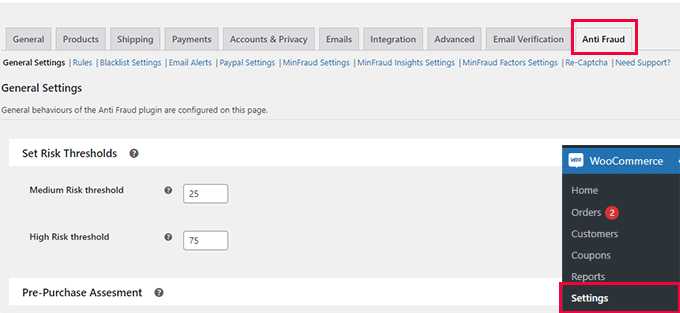
Once you have done that, you can also use the WooCommerce Anti Fraud plugin to prevent fake orders.
Upon activation, visit the WooCommerce » Settings page and switch to the ‘Anti Fraud’ tab. Here, you can set a minimum and high-risk threshold score.
Then, click the ‘Save Changes’ button.
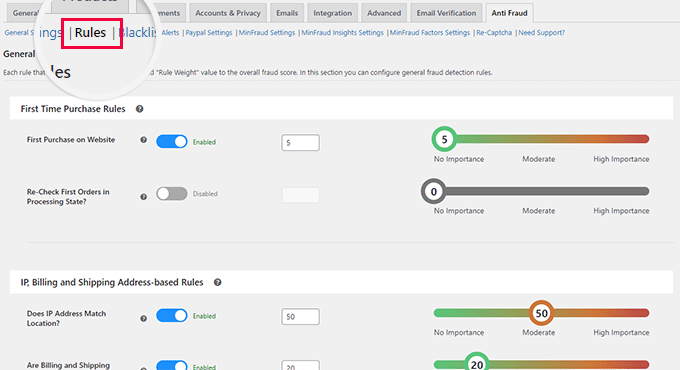
Next, switch to the ‘Rules’ tab, where you can set scores for suspicious IP addresses, emails, unsafe countries, matching IP addresses to geographic locations, and more.
Once you are done, click the ‘Save Changes’ button. The plugin will now catch any fake orders being placed by hackers on your store.
For more tips, see our tutorial on how to prevent fraud and fake orders in WooCommerce.
Frequently Asked Questions About eCommerce Security
Here are some of the most common questions we receive from store owners about securing their websites.
How do I secure my WordPress website?
The best way to secure a WordPress website is by using a high-quality hosting provider and installing a web application firewall (WAF). Additionally, you should keep all plugins updated, use strong passwords, and maintain regular backups.
Can WordPress be secure?
Yes, WordPress is a secure software platform when it is maintained properly. While the core software is safe, vulnerabilities usually arise from outdated plugins, weak passwords, or poor hosting environments rather than WordPress itself.
Is WordPress safe for eCommerce?
Yes, WordPress is safe for eCommerce and is used by millions of online stores worldwide. By using a secure plugin like WooCommerce and a PCI-compliant payment gateway like Stripe, your store can be just as secure as any proprietary platform.
Does WordPress have built-in security?
Yes, WordPress Core has strong built-in security measures that are constantly updated by a dedicated security team. However, it does not include a firewall or malware scanner by default, so store owners must add these layers themselves.
We hope this article helped you learn eCommerce security tips and how to secure your WordPress store. You may also be interested in our ultimate WordPress security guide or our complete eCommerce setup guide.
If you liked this article, then please subscribe to our YouTube Channel for WordPress video tutorials. You can also find us on Twitter and Facebook.



Samuel
This is a fantastic resource one can refer to when it comes to securing WordPress eCommerce site, use of secured hosting provider and regularly updating your plugin cannot be over emphersized along with two factor authentication. However, i will also like to suggest that one should regularly audit their security measures and stay informed about the latest security threats. Cybersecurity is an ever-evolving field, and staying proactive can make a significant difference. Kudos to the team that compile this guide.
David Lim
These days, two-factor authentication is a must. The many spam and hacking problems need to be avoided and prevented somehow. I have heard of experiences where themes or certain plugins (e.g. security plugins like Wordfence) sometimes interfere with Woocommerce.
Mrteesurez
Securing eCommerce store is crucial, and this post covers essential tips that every eCommerce site owner should follow. From my experience, using secure login details, like strong passwords and two-factor authentication, is the first line of defense against unauthorized access. Regular backups have also been a lifesaver for me, ensuring that even if something goes wrong, I can quickly restore my site. Additionally, opting for a secure payment gateway is non-negotiable. It not only protects your customers’ financial data but also builds trust, which is vital for any eCommerce business. Implementing these measures has given me peace of mind and kept my ebook store running smoothly.
Jiří Vaněk
When I was setting up my shop alongside the blog, I carefully chose my provider (the website is on my own server, and the shop is on shared hosting). Issues like DDoS protection, virus checks, etc., were important to me. Support is also crucial for me. I take the security of the shop very seriously, especially because of the users who enter their card payment details there. Thank you for all the tips you’ve listed. It’s really detailed. I already use some of them, but I’ll definitely focus on a few more, as the security of the shop goes hand in hand with user trust, which can be lost very easily.
Moinuddin Waheed
I have similar thoughts on having security concerns for all the websites and specially ecommerce stores where transaction is the norm.
we only give card details to websites we trust them for security and privacy of our card details hence it becomes utmost importance to develop our stores with this perspective in mind.
Users trust is something that can not be taken lightly as the growth of ecommerce store and users trust always go hand in hand.
Jiří Vaněk
Exactly. Besides the issue of customer trust, there is also the law on protecting sensitive data. I also have a WooCommerce store, and this is my biggest concern. In the Czech Republic, we have strict regulations. I’ve encountered hacked websites that used social engineering and phishing to lure sensitive information like payment card numbers from users. This really is a fine line when it comes to legal compliance. I’m glad that the WPBeginner team places such a strong emphasis on educating us users about security. It’s not that anyone wants to overlook these issues, but sometimes the connections or small details can be missed, and these guides are truly invaluable.