
Website performance and speed is the key to customer engagement and retention. Developers use various methods to ensure that the website loading time is less.
Overview
What is Lazy Loading?
Lazy loading defers the loading of certain content (like images or components) until it’s needed, often when the user scrolls or performs a specific action. It is used to increase web page performance.
What is Lazy Loading in Cypress?
Lazy loading in Cypress refers to a technique where elements like images or videos load only when they come into the viewport, improving page speed.
Steps to Capture Lazy Loaded Images for Visual Regression Testing in Cypress
- Use cy.scrollTo(‘bottom’) to load all lazy-loaded images.
- Capture Screenshot of the fully loaded page.
- Run and Compare the current screenshot with the baseline, highlighting any differences.
This article gives you a detailed explanation of how you can capture lazy loading images for visual testing in Cypress.
What is Lazy Loading in Cypress?
Lazy loading is a technique for delaying the loading of resources (like images, videos, or iframes) until they are needed, typically when the user scrolls them into view. This improves page performance and reduces initial load time.
In Cypress, lazy loading can create testing challenges because not all content may be visible or loaded when the test runs.
Also Read: Implementing Lazy Loading in React
How to capture Lazy Loading Images for Visual Regression Testing in Cypress
Cypress is a Test Automation tool built with NodeJS. It can be used for different types of testing, such as API Testing, End to End testing, Unit Testing, Integration Testing, and Component Testing.
Cypress supports Visual Regression Testing. The Cypress Visual Regression Testing article explains the basic setup. This article explores how to set up a Cypress Visual Regression Test for Lazy loading web pages.
Pre-Requisite: Setup Cypress Visual Testing
Usually, Lazy Loading website loads assets as you scroll, so when you perform Visual Regression tests you need to scroll down the page to the bottom. This action can be done using the cypress command
cy.scrollTo('bottom');The above command scrolls the page to the bottom so all resources will be loaded, and then you can take a screenshot.
Learn More: Capture Lazy Loading Images with Puppeteer
Run Cypress Tests on Real Device Cloud
The complete test script looks like the one below.
// visual-test.js
describe('Cypress Visual Testing Lazy Loading', () => {
it('Lazy Loading Test', () => {
cy.visit("https://sdk-test.percy.dev/lazy-loading/");
cy.scrollTo('bottom');
cy.compareSnapshot('lazy-loading');
})
})
Once you execute the test with the Cypress command
npx cypress run
The tests get executed, and the first run will be considered as the base run, Cypress captures the base image, and the subsequent run will compare with the base image and provide the result.
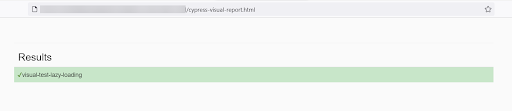
The report shows if there is any difference, highlighting the differences as seen below
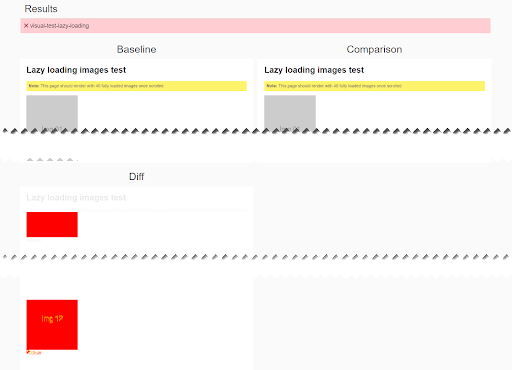
If there is no difference Cypress simply mark the test result as Pass
Difficulties with Lazy Loading in Visual Testing
As Visual Testing takes the screenshot of the web page and compares it with base images. Lazy loading makes the web resources load on demand, Images are also considered a resource so if you take a screenshot of the web page after navigating, you might not get the complete webpage. So, you need to work on a special testing mechanism for Visual Regression in Lazy Loading.
For example, when testing web page https://sdk-test.percy.dev/lazy-loading/ when you navigate to this webpage only a few images will be loaded as you scroll the images keeps on loading. This is an example of lazy loading.
Visual Testing with Lazy Loading Web Pages using Percy and Cypress
BrowserStack’s Percy is a cloud-based Visual Comparision tool, it provides a dedicated dashboard to compare the screenshots. Percy helps to review the images on the dashboard. The Percy provides cypress integration.
Cypress Visual Testing guide explains the integration of Cypress with Percy. Let’s discuss how to implement Cypress Percy for lazy loading websites.
Step 1 Install @percy/cypress and @percy/cli
npm install --save-dev @percy/cli @percy/cypress
Step 2 Import @percy/cypress
Add the import statement inside cypress/support/index.js
//inside cypress/support/index.js
import '@percy/cypress';
Step 3 Create your lazy loading Visual Tests with Cypress and Percy
// visual-test.js
describe('Cypress Visual Testing Lazy Loading', () => {
it('Lazy Loading Test', () => {
cy.visit("https://sdk-test.percy.dev/lazy-loading/");
cy.scrollTo('bottom');
cy.percySnapshot('lazy-loading');
})
})
Step 4 Sign into Percy and create a Project. To do so Copy the Percy Token from Project Settings
Step 5 Enter the Percy Token using the following command for
- macOS
export PERCY_TOKEN=<your_token>
- Windows OS Command Line
set PERCY_TOKEN=<your_token>
- PowerShell
$env:PERCY_TOKEN ="<your_token>"
Run your Percy Test
Execute your Percy Test using the command
npx percy exec -- cypress run
Once execution is completed, Navigate to Percy Dashboard and Check for the latest build
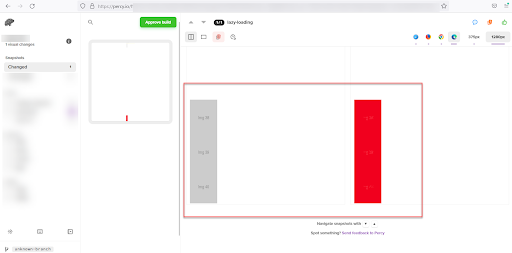
If there is a change Percy will show the difference side by side
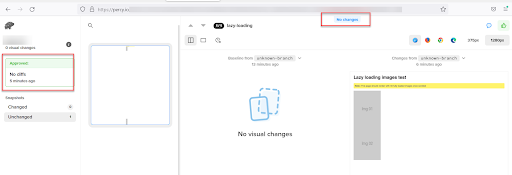
If there are no changes then Percy shows the message no Changes.
Why Percy Is Ideal for Cypress Visual Tests?
As Cypress tests increasingly intersect with modern UI patterns like lazy loaded images and components, teams need a reliable way to ensure that every visual element renders correctly under real conditions. Percy by BrowserStack brings stability to this workflow through automated, AI-backed visual testing that fits naturally into existing development and CI practices.
- Effortless Visual Regression Testing: Seamlessly integrates into CI/CD pipelines with a single line of code and works with functional test suites, Storybook, and Figma for true shift-left testing.
- Automated Visual Regression: Captures screenshots on every commit, compares them side-by-side against baselines, and instantly flags visual regressions like broken layouts, style shifts, or component bugs.
- Visual AI Engine: The Visual AI Engine uses advanced algorithms and AI Agents to automatically ignore visual noise caused by dynamic banners, animations, anti-aliasing, and other unstable elements. It focuses only on meaningful changes that affect the user experience. Features like “Intelli ignore” and OCR help differentiate important visual shifts from minor pixel-level differences, greatly reducing false positive alerts.

- Visual Review Agent: Highlights impactful changes with bounding boxes, offers human-readable summaries, and accelerates review workflows by up to 3x.
- No-Code Visual Monitoring: Visual Scanner allows rapid no-install setup to scan and monitor thousands of URLs across 3500+ browsers/devices, trigger scans on-demand or by schedule, ignore dynamic content regions as needed, and compare staging/production or other environments instantly.
- Flexible and Comprehensive Monitoring: Schedule scans hourly, daily, weekly, or monthly, analyze historical results, and compare any environment. Supports local testing, authenticated pages, and proactive bug detection before public release.
- Broad Integrations: Supports all major frameworks and CI tools, and offers SDKs for quick onboarding and frictionless scalability.
App Percy extends these capabilities to native mobile applications on iOS and Android. It runs visual tests on real devices to deliver pixel accurate results, while intelligent handling of dynamic elements reduces flakiness. Setup takes only one line of code, and support spans Appium, WebdriverIO, Java, Python, and more.
Parallel execution speeds up build times by up to ten times, and a unified dashboard provides logs, screenshots, and video recordings with full compliance to data privacy standards.
Pricing Details for Percy
- Free Plan: Up to 5,000 screenshots per month, suitable for smaller projects or initial adoption.
- Paid Plan: Starts at 199 USD with additional features and enterprise level scalability.
Advantages of Lazy Loading in Cypress Visual Testing
Here are the key advantages of lazy loading in Cypress Visual Testing:
- Faster Page Load Times: Only necessary content is loaded initially, improving load speed and reducing initial bandwidth usage, which is especially useful during test execution.
- Optimized Resource Usage: By deferring the loading of off-screen images or elements, it minimizes memory and processing demands, making tests more efficient, particularly on limited test environments.
- Improved Performance Feedback: Lazy loading helps simulate real user conditions more accurately during testing, allowing teams to identify performance issues early.
- Scalability for Large Pages: For pages with heavy content or long scrolls, lazy loading helps Cypress handle tests more smoothly by loading content in manageable chunks.
Learn More: How to Lazy Load Images in Javascript
Disadvantages of Lazy Loading in Cypress Visual Testing
Here is the list of key challenges:
- Increased Test Complexity: Additional Cypress commands like scrollIntoView() or explicit waits may be needed to ensure lazy-loaded elements are present.
- Visual Testing Inconsistencies: Lazy-loaded images may cause false failures in visual regression tests if snapshots are taken before content fully loads.
- Higher Maintenance Overhead: Visual tests involving lazy-loaded content require more careful timing and dynamic handling, increasing the complexity and upkeep of your test suite.
Conclusion
Visual Testing is a smart and easy way for testing website UI functionality, However, with the modern architecture and design of web pages, Visual Testing has, its challenges. Lazy loading is one such challenge, at some extent the lazy loading website can be tested. However, if the website has implemented infinity scrolling then it would be difficult to test such a website with Visual testing.
For more accurate results, it is always recommended to use a Visual Testing tool like Percy that allows users to test on real devices and browser. Moreover, it uses pixel by pixel comparison to ensure that the visual regression is accurate and supports all the popular test automation frameworks such as Cypress, Playwright, Puppeteer, Storybook, TestCafe, etc.
Useful Resources for Cypress
Understanding Cypress
- Cross Browser Testing with Cypress : Tutorial
- Run Cypress tests in parallel without Dashboard: Tutorial
- Handling Test Failures in Cypress A Comprehensive Guide
- Cypress Test Runner: Tutorial
- Handling Touch and Mouse events using Cypress
- Cypress Automation Tutorial
- CSS Selectors in Cypress
- Performance Testing with Cypress: A detailed Guide
- Cypress Best Practices for Test Automation
- Test React Native Apps with Cypress
- Cypress E2E Angular Testing: Advanced Tutorial
- Cypress Locators : How to find HTML elements
- Maximizing Web Security with Cypress: A Step-by-Step Guide
- Conditional Testing in Cypress: Tutorial
- Cypress Web Testing Framework: Getting Started
- Cypress Disable Test: How to use Skip and Only in Cypress
- What’s new in Cypress 10? How it will change your current testing requirements
Use Cases
- How to Record Cypress Tests? (Detailed Guide)
- How to run your first Visual Test with Cypress
- How to Fill and Submit Forms in Cypress
- How to Automate Localization Testing using Cypress
- How to run Cypress Tests in Chrome and Edge
- How to use Cypress App Actions?
- How to Run Cypress Tests for your Create-React-App Application
- How to Run Cypress Tests in Parallel
- How to handle Click Events in Cypress
- How to Test React using Cypress
- How to Perform Visual Testing for Components in Cypress
- How to run UI tests in Cypress
- How to test redirect with Cypress
- How to Perform Screenshot Testing in Cypress
- How to write Test Case in Cypress: (with testing example)
Tool Comparisons
- Cypress vs WebdriverIO: Key Differences
- Cypress vs Selenium: Key Differences
- Playwright vs Cypress: A Comparison
- Cypress vs Selenium vs Playwright vs Puppeteer: Core Differences
Frequently Asked Questions
1. Why does lazy loading create issues in Cypress visual tests?
Lazy loading delays rendering until an element enters the viewport, which can cause incomplete or inconsistent visuals if the snapshot is captured before all content loads.
2. How can one ensure all lazy-loaded content appears before taking a visual snapshot?
Scrolling the page manually or using cy.scrollTo() helps trigger lazy-loaded elements so that Percy or any visual testing tool captures the fully rendered UI.
3. Does one need to scroll the entire page during visual testing?
Yes. Scrolling through the full page ensures all sections, including below-the-fold images or components, have loaded and are ready for stable snapshots.