
Visual aesthetics are key to engaging customers. A well-designed, visually consistent website is more likely to captivate and delight users. This makes Visual Regression Testing essential with every release to ensure that new updates do not disrupt the visual integrity of your site, maintaining both functionality and appeal.
Overview
What Is a Visual Diff Algorithm?
A visual diff algorithm compares a baseline UI screenshot with a new one to detect unintended visual changes. It highlights differences in layout, color, and component placement that traditional functional tests cannot catch.
Why Visual Diff Algorithms Matter in Visual Testing?
Visual diffing strengthens UI quality by ensuring even the smallest visual regressions are caught early. Its core benefits include:
- Pixel-Level Accuracy: Identifies subtle shifts or inconsistencies by comparing UI images in detail.
- Speed & Automation: Replaces slow manual reviews with fast, repeatable checks integrated into CI/CD.
- AI-Driven Noise Reduction: Filters out harmless variations to minimize false positives.
- Scalability & Consistency: Delivers reliable results across browsers, devices, and resolutions.
- Actionable Reporting: Surfaces exact UI differences to help teams diagnose and fix issues quickly.
Top Tools for Visual Testing with Visual Diff Algorithms
- BrowserStack Percy: Automated visual testing with CI/CD integration.
- VisualTest: Cloud-based UI testing with pixel-by-pixel comparisons.
- Reg-viz: Open-source tool for detecting visual changes in web apps.
- Wraith: A screenshot comparison tool for automated UI testing.
- Needle: A Python-based visual testing tool for validating web layouts.
This article explores Visual Diff Algorithms, how they work, the need for automated visual testing, and why automation outperforms manual testing. It also covers how to perform visual testing with Percy.
What is Visual Diff Algorithm?
A Visual Diff Algorithm compares two images, typically a baseline (expected) image and a new (current) image, during visual testing. It identifies unintended UI changes, layout shifts, or regressions in software applications.
Unlike traditional text-based testing, which verifies code functionality, Visual Diff Algorithms analyze pixel-level differences to ensure UI consistency across browsers, devices, and screen resolutions. These algorithms streamline automated visual testing and reduce the need for manual comparisons.
The Visual Diff Algorithm is the logic behind visual regression testing. It allows the system to compare a baseline and an actual image pixel-by-pixel. This algorithm can be implemented in various programming languages, including Java, C#, and JavaScript.
Read More: Strategies to Optimize Visual Testing
How does the Visual Diff Algorithm work?
Just as how Functional Testing compares the actual result of the test case with the expected result and marks the test as Pass or Fail based on the difference, Visual Diff compares the visuals in a similar way using Test Automation.
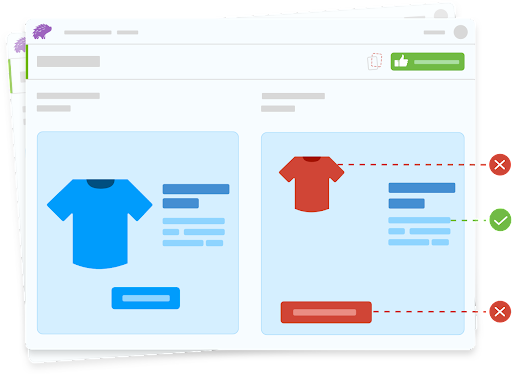
Steps to perform Visual Comparison
- First Run captures the baseline screenshot of the webpage and stores it as the reference image.
- The second run (subsequent) captures the screenshot (actual image) and compares it with the baseline image.
- The output will be produced based on the visual comparison algorithm in a diff image format.
- Before producing the output image, the tool considers whether there is any sensitivity factor or any other values that the user has specified.
Note: Sensitivity is also called threshold. The sensitivity factor or value defines how strictly comparison should take place. The higher the value, the lower the sensitivity and the comparison will ease out.
Why do you need Automated Visual Testing for Software?
Since Functional testing doesn’t guarantee that the UI elements rendered on the browser are correct and as expected. For example, the developer might have written the code where one button might partially overlap with the other, the functional test would still pass, but they are visually incorrect.
To catch all user interface-related bugs, you need Visual Testing.
Some of the common Visual Defects as below
- Issues with Font
- Issues with layout (such as padding, spacing margin, etc.)
- Issues while rendering (Based on the browser, the rendering may be different)
- Issues with Elements overlap
- Issues with Responsive screen
Why is Automation more efficient than Manual Visual Testing?
Manual visual testing typically involves a set of test cases and a design document or pre-captured screen, where the QA compares the webpage with a pre-captured screenshot by running a specific page on the website. The major problem with manual testing is since it is done by a human, giving attention to each and every pixel is impossible. The tester compares the screen based on their expertise and knowledge.
The output of the manual visual testing depends on the tester’s attention to detail capability. This makes manual Visual Testing complicated and provides less accuracy. Moreover, it will take a lot of time to test manually, causing a delay in the release.
Automated visual testing is always better in comparison with manual, as the screenshot capture and comparison are done by an automated tool. The automated visual testing tool compares the captured screenshot pixel-by-pixel so the output will be highly accurate and reliable. The produced output contains the difference in highlighted color, so it is easy to analyze and understand.
| Aspect | Automated Visual Testing | Manual Visual Testing |
|---|---|---|
| Speed | Fast, executes tests in seconds or minutes. | Slow, requires human effort to inspect each UI element. |
| Accuracy | High precision with pixel-by-pixel comparison. | Prone to human error and inconsistencies. |
| Scalability | Easily scales across multiple devices, browsers, and resolutions. | Limited scalability, requires more testers for larger coverage. |
| Efficiency | Runs test continuously in CI/CD pipelines. | Time-consuming and labor-intensive. |
| Regression Testing | Quickly detects unintended UI changes. | Difficult to catch minor UI regressions manually. |
| Cost | Higher initial setup cost but reduces long-term expenses. | Lower initial cost but expensive in the long run due to manual effort. |
| Consistency | Provides consistent results with no variations. | Results may vary depending on the tester’s perception. |
| Reporting & Tracking | Generates detailed reports with visual comparisons. | Relies on manual documentation, which may be inconsistent. |
| Best for | Large-scale projects with frequent UI updates. | Small-scale projects with minimal UI changes. |
How Percy Elevates Visual Testing with AI-Driven Diffing?
Percy by BrowserStack brings the principles of modern visual diff algorithms into a production-ready, AI-powered visual testing platform. Percy automates screenshot capture, comparison, and review by integrating directly into CI/CD pipelines. It ensures that all layout shifts, styling inconsistencies, and unexpected UI regressions are caught early and accurately. Its AI-driven diffing filters out noise, reduces false positives, and increases confidence in every release.
- Effortless Visual Regression Testing: Integrates with CI/CD using a single line of code and works seamlessly with functional test suites, Storybook, and Figma for early, shift-left visual validation.
- Automated Visual Regression:
Captures screenshots on every commit, compares them against baselines, and instantly flags meaningful UI changes like layout shifts, broken components, and style drifts. - Visual AI Engine: Uses advanced AI and algorithms to ignore dynamic banners, animation, anti-aliasing, and other unstable visual elements. Features like Intelli Ignore and OCR ensure only meaningful changes are flagged, cutting down false positives drastically.
- Visual Review Agent: Highlights significant visual changes with bounding boxes and provides clear summaries, accelerating review workflows by up to 3×.
- No-Code Visual Monitoring: With Visual Scanner, teams can monitor thousands of URLs across 3500+ browser–device combinations without installation. Run scans on demand or on a schedule, ignore dynamic regions, and compare staging and production instantly.
- Flexible & Comprehensive Monitoring: Supports scheduled scans (hourly/daily/weekly), authenticated pages, historical comparisons, local testing, and proactive regression detection across any environment.
App Percy extends the same reliable, AI-powered visual diffing to native iOS and Android applications. Running on real devices, it ensures pixel-perfect interface consistency while minimizing flakiness from dynamic UI elements. It supports Appium, WebdriverIO, Java, Python, and more, and offers scalable parallel execution for up to 10× faster build times, along with a unified dashboard for screenshots, logs, and videos.
Pricing
- Free Plan: Up to 5,000 screenshots/month
- Paid Plans: Starting at $199/month, with custom enterprise pricing
How to perform Visual Testing with the Visual Diff Algorithm using Percy?
Percy can easily be integrated with most of the popular frameworks, such as Cypress, Selenium, TestCafe, Storybook, Playwright, Puppeteer, WebDriverIO, and NightwatchJS.
Based on the automation framework of your choice, you can download the package or module and make the pre-requisite configurations to run the visual test on Percy.
Using Cypress framework to demonstrate how Percy performs Visual Testing using Visual Diff Algorithm.
Conclusion
Visual Diff Algorithm makes life easier by automating the visual regression tests to ensure that the website UI appears flawless and consistent to the user after every release. Percy is a Visual Testing Platform that uses a Visual Diff Algorithm to make pixel-by-pixel comparisons and highlight any visual changes in the website within a few minutes. Moreover, Percy is now able to carry out visual regression tests on mobile browsers as well, Safari for iOS and Google Chrome for Android.
Useful Resources for Visual Testing
- How to capture Lazy Loading Images for Visual Regression Testing in Cypress
- How to Perform Visual Testing for Components in Cypress
- How to run your first Visual Test with Cypress
- How Visual Diff Algorithm improves Visual Testing
- How is Visual Test Automation changing the Software Development Landscape?
- How does Visual Testing help Teams deploy faster?
- How to perform Visual Testing for React Apps
- How to Run Visual Tests with Selenium: Tutorial
- How to reduce False Positives in Visual Testing?
- How to capture Lazy Loading Images for Visual Regression Testing in Puppeteer
- How to migrate your Visual Testing Project to Percy CLI
- Why is Visual Testing Essential for Enterprises?
- Importance of Screenshot Stabilization in Visual Testing
- Strategies to Optimize Visual Testing
- Best Practices for Visual Testing
- Visual Testing Definitions You Should Know
- Visual Testing To Optimize eCommerce Conversions
- Automate Visual Tests on Browsers without Web Drivers
- Appium Visual Testing: The Essential Guide
- Top 17 Visual Testing Tools
Frequently Asked Questions
1. How do visual diff algorithms detect UI regressions more accurately than traditional visual testing methods?
Visual diff algorithms compare baseline and new UI snapshots in detail, highlighting small shifts in layout, spacing, color, or typography. Unlike manual reviews or functional tests, they provide objective pixel-level or AI-assisted comparisons that catch subtle visual regressions that humans often miss.
2. What role does AI play in reducing false positives during visual regression testing?
AI helps distinguish meaningful UI changes from harmless variations such as anti-aliasing, dynamic content, or rendering differences. Modern tools use AI-based noise reduction, smart region detection, and intent analysis to show only the visual differences that actually matter.
3. What are the main challenges in visual testing?
Visual testing often faces issues like rendering noise, inconsistent environments, and slow manual reviews. Visual diff algorithms, along with tools like Percy, automate snapshot capture, standardize testing environments, apply AI-based filtering, and provide clear comparison reports across browsers and devices to make visual testing more scalable and dependable.
4. How can I integrate automated visual diffing into a CI/CD pipeline to catch layout or design changes before deployment?
Most modern visual testing tools provide CLI commands, SDKs, or integrations for CI services such as GitHub Actions, Jenkins, and CircleCI. After integration, the pipeline can automatically capture snapshots, compare them to the baseline, and approve or block builds based on detected visual differences. This ensures that UI regressions are caught before deployment.